Computer Power Repair (Won't Turn On) in Charlotte, NC
A computer that won't power on rarely means it's dead: laptops often need a charging port, battery or charger, desktops a power supply; deeper faults involve motherboard power circuitry.
Bring in the computer and its charger. We test the adapter, battery or power supply, then the board's power rails, and tell you exactly what failed before any work starts. Most no-power repairs are done same or next day. The exact price for your model is shown on this page, the diagnostic is free, there's no fee if we can't fix it, and the repair carries a 90-day warranty.
Signs you need this repair
No LEDs, no fan spin, no keyboard backlight. On a laptop that usually means the charger, the port or a short on the board.
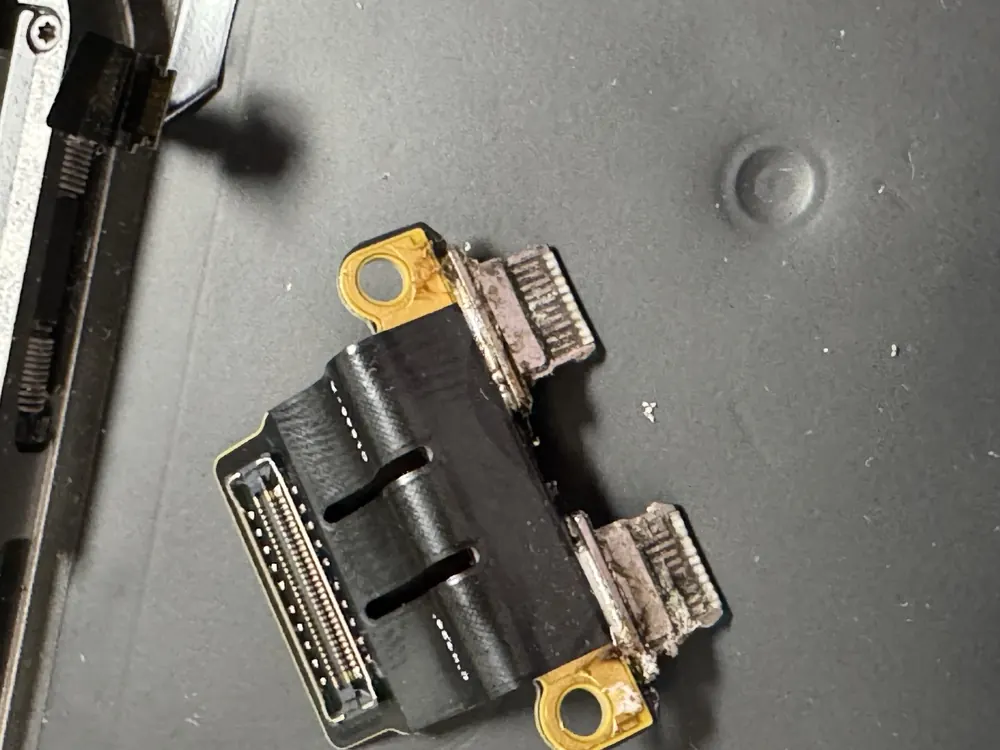
A laptop that only charges when the cable is held at an angle has a worn DC jack or USB-C port, or a damaged cable. Left alone, a loose connection can arc and burn the port.
On a desktop, the power supply is shutting itself down, or a shorted part is tripping it.
The machine has power but isn't finishing its startup checks. Memory, the display path or a board fault are more likely than the power supply here.
The battery is worn out or the charging circuit isn't feeding it. A swollen battery belongs in this group too and should be replaced soon.
Unplug it and leave it unplugged. Something has failed hard, often a capacitor, MOSFET or the power supply itself, and powering it again can spread the damage.
What usually causes it
Laptop adapters and USB-C cables fail more often than the laptops they charge. A wrong-wattage USB-C charger can also leave a laptop refusing to charge or start.
Years of plugging in loosens the DC jack or USB-C port, and the solder joints underneath crack. Many are soldered straight to the motherboard.
Power supplies age, especially with dust and heat. When one fails it can take nothing else with it, or it can stress the motherboard on the way out.
A single shorted capacitor or failed power IC can pull the whole input rail to zero, so the computer looks completely dead even though most of the board is fine.
How we fix it
- 1Start with the cheap suspects
We test your charger under load, check the cable, and on a desktop test the power supply's rails and the front-panel power switch wiring.
- 2Battery and port check
We open laptops, disconnect the battery, and see if the board starts on external power alone. We check the port's solder joints under magnification.
- 3Measure the power rails
With the board on a bench power supply we watch how much current it draws. A board that pulls heavy current with no screen points to a short, and a board that pulls nothing points to a missing input or a failed controller.
- 4Find the shorted part
We inject a small, safe voltage into the shorted rail and look for the component that warms up. That points to the exact part to replace.
- 5Repair at component level
We replace the failed port, power supply, battery or board component. You approve the quote before we touch anything beyond the free diagnostic.
- 6Load test before pickup
We charge it, run it on battery, and put the processor and graphics under load so a weak repair shows up on our bench and not at your desk.
What usually gets replaced
Most no-power faults come down to one of a few parts. The diagnostic tells us which, so you only pay for the one that failed.
The simplest fix. You can buy the replacement yourself if you prefer.
Some ports sit on a small daughterboard and swap out cleanly. Others are soldered to the motherboard and need micro-soldering.
Needed when the pack is worn, swollen or won't accept a charge.
We match wattage and connectors to your build and leave headroom for the graphics card, so the new unit isn't running at its limit.
A charging IC, MOSFET, fuse or capacitor replaced on the motherboard. This is often far cheaper than a new board.
How long it takes
Most power repairs are finished same or next day. Chargers, ports and desktop power supplies are the quick ones. A board short takes longer to trace, and a model-specific part we have to order can push it past the next day. We give you the timeline with the quote.
Models we repair
What customers say
Went in because my laptop died after plugging in the charger, and Gus helped diagnose the issue to be a power surge and got the data recovered!Sudhamsh Mondrati · Laptop power · Google review
… I originally brought it in with my external hard drive, hoping to just get the few files off the laptop BUT in less than an hour Michael had the old faithful laptop back up and running.Chozen Child · Laptop power · Google review
… I wouldn't trust just anybody fixing your motherboard, this guy knows what he's doing! 5 STARS . THANK YOU SO MUCH 💪❤️Daddy Tony2times · Board-level repair · Google review
Real customer reviews from Google and Yelp, quoted word for word. … marks where a longer review was shortened.
Protect your computer and everything else at home
Covered Everything protects your phone plus up to 25 more devices, like consoles, laptops and tablets, for $19.99 a month. Set it up when you collect your repair.
How Covered works90-day warranty
On parts and workmanship.
Covered Everything
$99 per claim on this computer, $50 on your phone. Cancel anytime.
Fixed here, on our bench
Bring it in and we handle the claim with you.
Before you bring it in
- Bring the charger and cable you normally use, even if you suspect them. Testing your exact adapter is part of the diagnostic.
- For a desktop, the tower alone is enough.
- Write down what happened right before it died: a storm, a spill, a drop, a new charger, a Windows update.
- If it still powers on now and then, copy anything important to a USB drive or the cloud while you can.
- Have your login password handy so we can confirm it boots fully.
Repair or replace?
A computer that won't turn on is usually worth a free diagnostic, because the fix is so often a charger, a port or a power supply. If it turns out to be a board fault, repair still makes sense for most machines under about six years old or anything with a good processor and screen. It makes less sense for a slow budget laptop, or a board with corrosion spread across several areas. In that case we'll say so, and we can pull your files off before you move on.
Thinking of fixing it yourself?
Some of this is fair to try at home. Test a different outlet, try another charger with the right wattage, hold the power button for 30 seconds with the charger unplugged, and on a desktop check that the switch on the back of the power supply is on and the 24-pin and CPU power cables are seated. Stop there if you smell burning, see a swollen battery, or the problem is inside a laptop. Probing a laptop board blind is how one blown part becomes several.
After your repair
- Use a charger rated for your laptop's wattage. Low-wattage USB-C phone bricks can charge slowly or not at all.
- Unplug from the side of the plug, not by yanking the cable at an angle, to save the new port.
- Put desktops on a surge protector, or a battery backup if you get brownouts.
- Don't leave a laptop flat for months. Charge it to around half before putting it away.
Questions people ask
My laptop won't turn on at all. Is it worth fixing?
Usually, yes. The most common causes are a failed charger, a loose charging port or a dead battery, all of which are routine repairs. Even a board fault is often one small part. The diagnostic is free, so you'll know what it is before you decide.
How do you tell if it's my charger or the laptop?
We test your adapter under load and check its output, then power your laptop from a known-good supply. If the laptop starts on ours, it was the charger. If it doesn't, we keep going into the battery, port and board.
Will I lose my files if my computer can't power on?
In most power failures the drive is untouched, because the fault is in the charging or power circuit. We'll tell you before we start if a repair carries any risk to your data. If the board can't be saved, we can usually recover files from the drive separately.
How much does a no-power repair cost?
The starting price and the price for your model are shown on this page. The diagnostic is free, and if we can't fix it you don't pay.
How long does a power repair take?
Most are back same or next day. A board short or an ordered part can take longer, and we'll say so up front.
My desktop fans spin and then it shuts off. What is that?
The power supply is shutting down to protect itself. It's either a weak supply or something drawing too much, like a shorted graphics card or motherboard component. We test the supply alone first, then add parts back one at a time to find the one causing it.
Is a swollen laptop battery dangerous?
Yes, stop charging it and never puncture it. Bring it in and we'll replace it.
Can I mail my computer in?
Yes, from anywhere in the US, with free insured return shipping. Pack the charger with it.
Related repairs
Mail-in repair from anywhere in the U.S.
Free diagnostic when it arrives. Free insured shipping back.
- 1Tell us your model and the problem
- 2Ship it insured. We diagnose it within a day
- 3Approve the price. Fixed and back in 7–10 days