DIY Repair Gone Wrong? We Fix Those. No Judgment.
Board-level rescue for devices damaged during DIY repairs (torn ribbon cables, connectors pulled off boards, no power after reassembly); bring it as-is with screws and parts bagged for a free diagnostic, honest quote and no lecture.
Do this now
We rescue
Your exact price in 3 taps
Pick your model and the problem. Book a time.
Stop, bag every screw and part, and bring it in as is. The diagnostic is free and there's no lecture. We fix torn ribbon cables, connectors pulled off boards, Face ID and Touch ID trouble and no-power-after-reassembly at board level on our Charlotte bench, and quote before touching anything. Most repairs are done the same day, with no fix, no fee and a 90-day warranty.
Signs you need this repair
A display, battery or button flex came out torn, creased or with its connector end missing. Sometimes the part needs replacing, and sometimes the tear can be repaired.
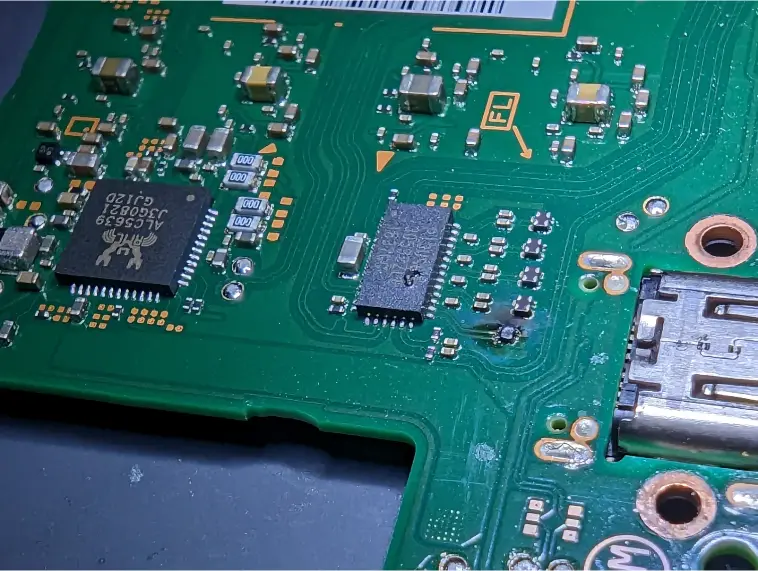
You pulled a cable and the socket came with it, often with tiny pads lifted off the board. This is very fixable at board level, but only if nobody keeps trying.
The new screen works but Face ID says it's unavailable, or the home button clicks but won't read your fingerprint.
Everything went back together and now there's no power, no image, or a boot loop. A connector not seated, a pinched cable or a screw in the wrong hole are the usual suspects.
The new screen shows nothing, flickers or has lines. Either the part is faulty, the connector isn't seated, or the connector on the board was damaged.
A pry tool went into the battery, or it's puffed up, smoking or smells sweet. That's a fire risk. Get it outside on concrete and call us.
The PS5 fan connector is a common one. The cable is short, the socket is small, and it often comes off the board with the plug.
What usually causes it
Working with the battery connected means one slip with a tool can short a circuit. Many dead-after-repair devices start here.
Flex connectors are meant to be lifted straight up from the connector body. Pulling the ribbon or levering with metal tears the cable or rips the socket off.
A long screw in a short hole can drive through the board and break the layers underneath. On iPhones this is called long screw damage, and it can kill the board.
Heat guns and hot plates set too high can move small components, warp cables and damage adhesive-sensitive parts like Face ID components.
Touch ID buttons and the Face ID dot projector are paired to the original board. Swapping or damaging them breaks biometrics even if the repair is otherwise perfect.
How we fix it
- 1No lecture intake
Tell us what you did, in what order, and when it went wrong. That saves diagnostic time. We've seen most DIY mistakes before.
- 2Inspect under the microscope
We look at every connector, cable and pad under a stereo microscope. Lifted pads, broken traces and cracked connectors show up clearly at that magnification.
- 3Check power before anything else
We power the board from a bench supply and watch the current. A short from a mis-seated connector or a damaged component shows up right away.
- 4Board-level repair
Ripped connectors are replaced, lifted pads are rebuilt, and broken traces are bridged with fine jumper wire. PS5 fan connectors and iPad display connectors are common examples.
- 5Restore biometrics where possible
On some iPhone generations part of the Face ID system rides on the earpiece flex, and we move it correctly to the new screen. Touch ID needs your original home button. If a paired part is destroyed, we tell you plainly what can and can't be restored.
- 6Reassemble and test
We put it back together with the correct screws in the correct places, then test power, display, touch, charging, cameras, buttons and biometrics.
What we can usually save
Most DIY damage is fixable. What matters is what broke and whether the original parts are still here.
Replaced when the cable is part of a swappable part. When it's attached to something you need to keep, a repair may be possible.
A new connector is soldered on after rebuilding the pads. Usually a good outcome if no one has kept trying.
Depends on the original parts. Bring them, even broken. Paired components can't be replaced with new ones.
Replaced, and we check the board for any heat damage.
How long it takes
Most DIY rescues are done the same day. Power-on problems are often a same-day fix, but sometimes they turn into a board-level repair that takes longer. We tell you what to expect after the diagnostic.
Before you bring it in
- Stop. Don't try to fix the fix.
- Don't power it on or charge it again.
- Bag every screw, bracket and part, including broken pieces. Tape screws to paper in their layout if you can.
- Bring the original parts, like the home button, Face ID module, fingerprint sensor and old screen.
- Tell us which guide you followed and what parts you used.
- If the battery is punctured or smoking, put it outside on concrete away from anything flammable and call us before bringing it in.
Is it worth rescuing?
Almost always more than people think. A ripped connector or a torn cable sounds catastrophic, but it's often a routine board repair that costs much less than a new device. The diagnostic is free, so the only cost of finding out is the trip. If the damage is beyond saving, we'll tell you plainly.
Thinking of fixing it yourself?
If you're reading this mid-repair, here's the honest advice. If it won't power on, disconnect the battery, reseat each connector you touched by pressing straight down until it clicks, reconnect the battery last and try once. If nothing changes, stop. Don't try to resolder a connector with a regular iron, glue pads down or swap in another part to test. Each attempt makes the board repair harder. Bring it in with everything.
After your repair
- Use the device for a day and bring it back if anything acts strangely.
- If you try another DIY repair, disconnect the battery first and lift connectors with plastic tools only.
- Keep screws organized by location with a magnetic mat or tape on paper.
- Buy parts from sellers with good reviews and test them before fully closing the device.
Questions people ask
I tore a ribbon cable. Is my phone dead?
Probably not. If the cable is part of a replaceable part, like a screen or battery, the part is replaced. If it's attached to something you need to keep, a repair may be possible. Bring the cable and the device.
I broke the PS5 fan connector during a cleaning. Can it be fixed?
Yes. It's one of the most common DIY rescues. We rebuild the pads if needed and solder on a new connector.
Face ID stopped working after I changed my screen. Can you restore it?
Often, if the problem is a part that wasn't transferred properly, or a cable that was damaged. If the dot projector itself was damaged, Face ID can't be restored by replacing it, and we'll tell you so.
My phone won't turn on after I reassembled it. What now?
Check that the battery connector is seated, and stop there. We'll check for shorts, pinched cables and long screw damage, and fix what's wrong.
The battery got punctured. What do I do?
Get it outside on a non-flammable surface, away from anything that can burn, and stay away from the smoke. Don't charge it or use it. Call us before bringing it in.
Will you judge me?
No. People try their own repairs all the time, and plenty of good techs started that way. We just fix it.
Can you finish the repair with the part I bought?
Often, yes, if the part is good. We test it first. Cheap parts are a common cause of trouble, and we'll tell you if yours is the problem.
How much does a DIY rescue cost?
It depends entirely on what's damaged. The diagnostic is free, you get a quote before we start, and if we can't fix it, you don't pay.
Do you rescue laptops, consoles and tablets too?
Yes. We work on iPhones, iPads, Macs, PCs and game consoles, including PS5.