Repair video
MacBook Air screen replacement

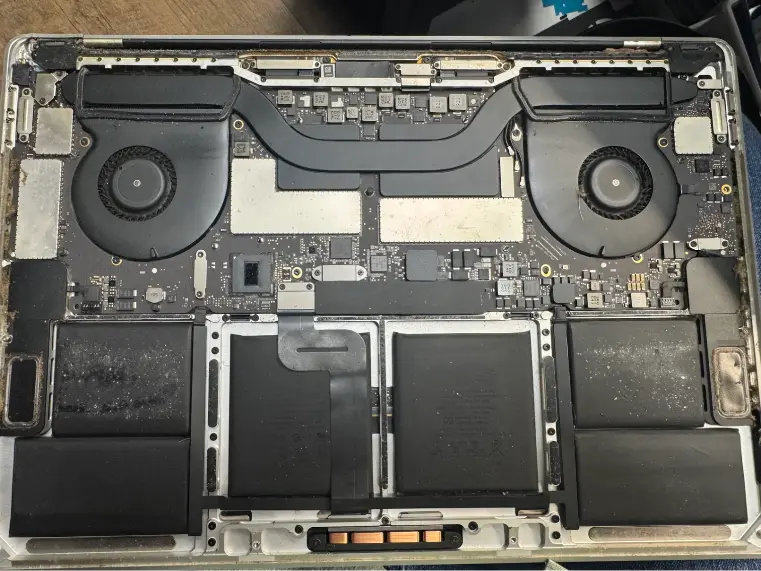
This MacBook Air was dropped or stood on and the screen cracked. We took off the bottom case, took the battery out, undid the display cables and hinges, fitted a new screen, and it boots again.
Apple commonly replaces the whole display assembly even when one component failed; the shop runs component-level diagnostics first and offers LCD-only or board-level fixes where damage allows, quoting a full assembly up front only if that's the reliable fix.
Not in the Charlotte area? Mail it in from anywhere in the U.S.
Bring in your MacBook for a free display diagnostic. We find out whether it's the LCD, the backlight, the display cable or the board, then quote the least invasive fix that will last: LCD only, board-level, or full assembly. Most MacBook screens take 1 to 3 days. The exact price for your model is shown on this page, and Covered Screen plus our 90-day warranty are included.
The most common MacBook Air M1 and M2 screen failure. A crumb, earbud or cable on the keyboard is enough to crack the panel.
Uneven light spots along the bottom, then a fully dark screen when the lid opens past a certain angle. This is flexgate, common on 2016 and 2017 MacBook Pros.
You hear the chime or see it on an external display. Backlight, display cable or the board's backlight circuit.
Fixed lines usually mean the LCD is damaged. Lines that change with lid angle point to the cable.
Patches where the anti-reflective coating has worn away. Seen on older Retina MacBooks and not fixable by cleaning.
Halo artifacts beyond normal or dark zones on 14 and 16 inch MacBook Pros can mean a failing mini-LED backlight.
MacBook screens sit very close to the keyboard when closed. Anything left there presses straight into the LCD.
On some MacBook Pros the backlight cable is short and wears through as the lid opens and closes.
Corner impacts crack the panel and can bend the aluminum lid, which makes a clean repair harder.
A spill can damage the display connector or backlight circuit on the logic board.
We test with an external display, check the backlight with a light test, inspect the display connector and cable, and check the lid for bends.
LCD only if the lid, cable and backlight are sound. Board-level if the fault is the backlight circuit or connector. Full assembly when that's the reliable fix. You pick.
The cracked panel is separated from the lid and a new one is fitted with fresh adhesive. Done right, this keeps your original lid, hinges and camera.
Blown backlight fuses, a damaged display connector or a failed backlight driver are replaced on the logic board under a microscope.
We check brightness range, color, True Tone, the camera, sleep and wake with the lid, and the image at every lid angle.
MacBook Air screen replacement. Watch the full repair, step by step
Apple's standard repair is often a full display assembly. That's not always necessary, and we'll show you which option fits your damage.
Replaces just the panel inside your existing lid. Usually the most cost-effective choice for a cracked screen on an undamaged lid.
For backlight and connector faults where the panel itself is fine. Often fixes black screens without a new display.
Lid, panel, hinges, camera and cables in one unit. Best for bent lids, flexgate-damaged cables and some XDR panels.
Included with every screen replacement. Crack it again within 12 months and the next one is free.
MacBook Air M1, M2 and M3, 13 inch MacBook Pro and Intel Retina screens are usually done in 1 to 3 days. Liquid Retina XDR panels on 14 and 16 inch Pros, and parts we need to special order, can take longer. Board-level backlight repairs depend on what we find, and we'll give you the timeline with the quote.
This MacBook Air was dropped or stood on and the screen cracked. We took off the bottom case, took the battery out, undid the display cables and hinges, fitted a new screen, and it boots again.
… off my MacBook because the screen was cracked, I was told it will be ready in a week and it was ready in three days. I even receive tips on accessories to protect my keyboard and screen. …Kingdom Kreations · MacBook screen · Google review
… I originally brought it in with my external hard drive, hoping to just get the few files off the laptop BUT in less than an hour Michael had the old faithful laptop back up and running.Chozen Child · Laptop repair · Google review
Michael if We Save Data is AMAZING!! He is definitely the guru of this business! Michael restored my laptop after I locked myself out, could not remember the password and no longer had access to my old email account. …Alana Gibbs · Laptop repair · Google review
Real customer reviews from Google and Yelp, quoted word for word. … marks where a longer review was shortened.
Covered Everything protects your phone plus up to 25 more devices, like consoles, laptops and tablets, for $19.99 a month. Set it up when you collect your repair.
How Covered worksOn parts and workmanship.
$99 per claim on this MacBook, $50 on your phone. Cancel anytime.
Bring it in and we handle the claim with you.
A cracked screen on an Apple Silicon MacBook is worth repairing. The rest of the machine is usually fine and has years left. An LCD-only repair keeps the cost down further. On an older Intel MacBook that can't run current macOS, compare the repair quote with what you'd spend on a newer model. If the lid is badly bent or there's liquid damage too, we'll factor that into the advice.
MacBook screens aren't a friendly DIY repair. Full assemblies need the hinge and antenna cables handled carefully, and LCD-only replacement means separating a bonded panel from the lid without cracking the new one or damaging the backlight layers. Kits sold online often use panels that look fine but differ in brightness or color. If you tried and now have no image, stop and bring both the MacBook and any parts you removed.
Often, if the lid, hinges, cables and backlight hardware are sound. We confirm it at the free diagnostic.
Apple usually replaces the full display assembly. LCD-only and board-level options can cost significantly less when your damage allows them.
Most models take 1 to 3 days. XDR panels and special-order parts can take longer.
We use quality replacement panels and assemblies and explain the part option for your model before any work starts.
On 2016 and 2017 MacBook Pros, the display backlight cable is short and wears through with lid movement. It starts as stage-light glow and ends with a dark screen past a certain angle.
We test True Tone after every MacBook screen repair and tell you before starting if the part option for your model affects it.
Not always. It can be the backlight circuit on the board or the display cable. We test before replacing anything.
Yes, a 90-day warranty on the repair, plus Covered Screen for 12 months.
Yes. Send it from anywhere in the US and we'll return it insured at no shipping cost to you.
Free diagnostic when it arrives. Free insured shipping back.