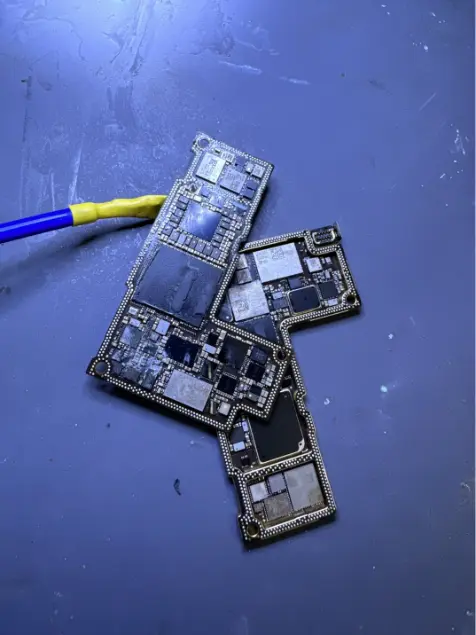
Water Damage Data Recovery in Charlotte, NC
Water damage is a race against time. The team treats boards in-house and can access storage chips directly even without a working logic board.
Not in the Charlotte area? Mail it in from anywhere in the U.S.
Get the device to us powered off, fast. We clean and treat the board in-house, then recover data from phones, tablets, laptops, external drives, USB drives, memory cards and drones. The evaluation is free and you get a fixed price before work begins. Starting prices for each device type are on this page. Most cases take 3 to 7 business days, with no fee if nothing is recovered.
Signs you need this repair
A pool, toilet, sink, lake or puddle. Even a few seconds underwater is enough to reach the board.
Coffee, soda or water across the keyboard, and the laptop shut off or won't start. Liquid runs under the keys and pools on the board.
Left outside in a storm, caught in a flooded car or basement, or packed in a wet bag.
An external hard drive, USB stick or memory card that was in water and now isn't recognized, or makes new noises.
It seemed fine for a day or two, then started overheating, flickering, restarting or died. That's corrosion spreading.
It's been in rice or sat in a drawer for a week, and it still won't power on. Drying doesn't undo corrosion.
What usually causes it
Current flowing through water burns components and eats away traces. A device that stays on, or gets turned on wet, takes the most damage.
Water leaves minerals on the board. Those keep corroding the board for days and weeks, especially under chips.
Pool chlorine, salt water and sugary drinks corrode faster than clean tap water. Tell us what it was.
Spinning hard drives have a small breather hole. Water that gets in contaminates the platters, so powering the drive can scrape the data off.
How we fix it
- 1Emergency intake
Walk in Monday to Saturday with the device off. We note what liquid it was, when it happened and whether it was powered on after.
- 2Strip it down
We take the device apart, disconnect the battery and inspect the board and storage under the microscope to see where the liquid went.
- 3Clean before power
Corrosion and residue are cleaned off the board, under and around chips and connectors. Then it dries fully before any power is applied.
- 4Phones, tablets and newer Macs
These encrypt their storage and tie it to the processor, so we repair the board until it boots, then copy the data with your passcode. On MacBooks with T2 or Apple silicon, the SSD is soldered to the board, so the same approach applies.
- 5Drives, cards and older laptops
Removable drives, USB sticks and memory cards are cleaned, then imaged sector by sector, and we work from the copy. Hard drives with water inside need the most careful handling and we tell you the odds first.
- 6Recover and deliver
Files are extracted, checked and delivered on new media. You pay only if we recover your data.
How it differs by device
Water affects each kind of device differently, and that changes how we recover it.
Encrypted storage means the original board has to run. Board repair is the recovery.
Newer MacBooks have soldered SSDs. Many Windows laptops have removable drives that can be imaged directly.
Water inside the drive case is serious. Don't power it on.
Cards and flash drives usually clean up and read well. Drones with internal storage need board work.
How long it takes
Most water damage recoveries take 3 to 7 business days. Light exposure caught quickly is at the short end. Salt water, sugary drinks, long delays and devices that were powered on wet take longer, because there's more corrosion to clean and more board repair before the data can be read.
Models we repair
What customers say
… my photos and videos of my sister’s wedding but then I had the fortune of coming upon this amazing shop! They got everything back for me and I think even made my phone work faster!! …Mo · Phone data recovery · Google review
Lost all my data due to a broken screen. Nothing was backed up. Phone was not working and We Save Data was able to capture and restore all my Data and everything!!! Awesome experience and excellent customer. I am one HAPPY customer!!Unithia McGruder · Phone data recovery · Google review
Apple told me that my phone and data could not be saved and Michael literally saved all my memories. He is absolutely amazing. I am so happy and it was so fast. Worth every dime I paid.Chef Seli Cooking With Love · Phone data recovery · Google review
Real customer reviews from Google and Yelp, quoted word for word. … marks where a longer review was shortened.
Before you bring it in
- Turn it off and leave it off. Don't charge it to check.
- Skip the rice. It doesn't reach the board and adds dust.
- Pull the SIM tray and any memory card, and put the card somewhere dry without formatting it.
- For laptops, unplug the charger, turn it upside down in a tent shape and bring it in.
- Tell us what the liquid was and how long ago it happened.
- Know your passcode or login password.
Is recovery worth it?
Water cases are time-sensitive. If the data isn't backed up, bring it in now and decide after the free evaluation, because every day of corrosion lowers the odds. If your photos were syncing to the cloud, check there first. We'll tell you honestly if it's not worth it.
Thinking of fixing it yourself?
The only safe home steps are to power it off, unplug it, remove the SIM and memory card, and keep it from being turned on. Hair dryers push water deeper and heat can damage components. Opening a phone or laptop at home usually tears a cable or a seal and doesn't remove corrosion. Above all, don't keep testing it by turning it on.
After your repair
- Turn on automatic backups for photos and files.
- If the device was repaired, watch for overheating or random shutdowns in the following weeks.
- Keep drinks away from laptops and phones off the edge of the tub.
- Store backup drives off the floor, where floods and spills can't reach them.
Questions people ask
My phone got wet. What should I do right now?
Turn it off, don't charge it, take out the SIM tray and bring it in as soon as you can. Skip the rice.
Can you recover data from a water-damaged phone that won't turn on?
Often, yes. We clean and repair the board until it boots, then back up the data. Your passcode is required.
Can you recover data from a water-damaged MacBook?
Often, yes. On newer MacBooks the SSD is soldered to the logic board and encrypted, so we repair the board until it boots, then copy the data.
Does rice work?
No. Rice doesn't dry the board, doesn't remove corrosion, and can leave dust in ports. Time spent waiting in rice is time corrosion is spreading.
I already dried it out. Is it too late?
Not necessarily. Drying doesn't stop corrosion, so bring it in now. The sooner, the better.
Can you recover data from a wet external hard drive?
Sometimes. Don't plug it in. Water inside a hard drive can destroy the platters once it spins. We'll evaluate it first.
How long does water damage data recovery take?
Most cases take 3 to 7 business days, depending on how much corrosion there is and what kind of device it is.
Is this the same team as We Save Data?
Yes. We've recovered data in Charlotte since 2013, first as We Save Data and now as Charlotte Tech Repair.
Does the no recovery, no fee policy apply to water damage cases?
Yes. If we can't get your data back, there's no recovery charge.
Related repairs
Mail-in repair from anywhere in the U.S.
Free diagnostic when it arrives. Free insured shipping back.
- 1Tell us your model and the problem
- 2Ship it insured. We diagnose it within a day
- 3Approve the price. Fixed and back in 7–10 days