External Hard Drive Recovery in Charlotte, NC
External hard drives often hold irreplaceable backups; the shop has recovered files from external drives and portable SSDs since 2013, starting with a free evaluation.
Not in the Charlotte area? Mail it in from anywhere in the U.S.
We recover files from external hard drives, portable SSDs and backup drives here in Charlotte. The evaluation costs nothing and ends with a fixed price. You'll find the starting price on this page. We image the drive first, work from the copy, and deliver your files on new media. Expect 2 to 5 business days for most drives. No recovery, no fee.
Signs you need this repair
It was knocked off a desk and now the computer doesn't see it, or it spins up and stops. Drops are hard on the heads inside.
Click-click-click or a buzz with no spin-up means mechanical failure. Unplug it now.
The drive is detected but shows as RAW, empty or unformatted. The file system is damaged, but the data is often still there.
It appears in Explorer or Finder but freezes, takes forever to open, or throws errors.
It worked yesterday and now isn't detected at all. SSDs tend to fail suddenly and quietly.
The drive was unplugged mid-copy or lost power, and now it won't mount properly.
What usually causes it
Portable drives get dropped, kicked or knocked over while running. The heads can hit the platters and damage both.
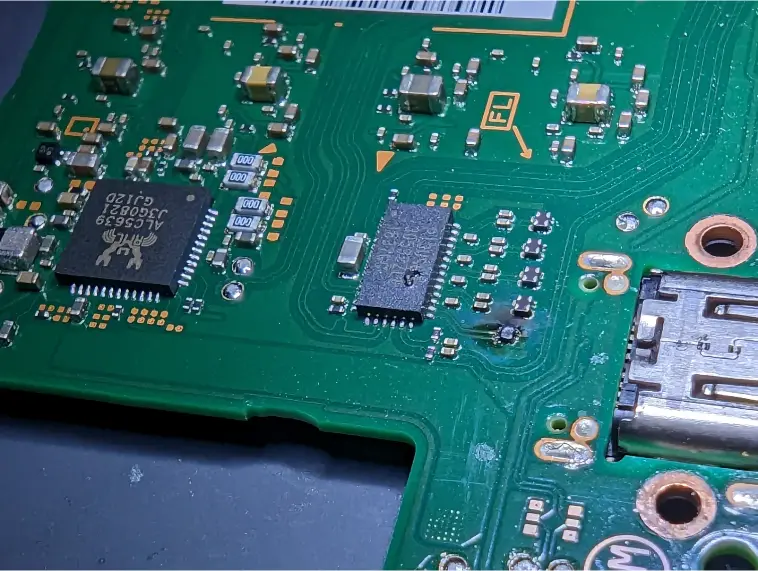
Inside the case, a small board converts USB to the drive's interface. It can fail on its own or after a power surge. On some drives it also handles encryption.
Unplugging without ejecting, especially with exFAT drives shared between Mac and Windows, can corrupt the file system.
Desktop external drives run on a separate power adapter. A surge, or the wrong adapter from another device, can burn components on the drive board or the USB board.
Backup drives that sit for years and then get used again can develop bad sectors or sticking heads.
How we fix it
- 1Free evaluation
We check whether the problem is the USB board, the drive inside, or the file system, and give you a fixed price.
- 2Get to the drive
We open the enclosure to reach the drive itself. Some external drives have encryption built into the USB board, and on those the original board has to be kept or repaired, since the drive alone can't be read.
- 3Repair the board when needed
If the USB board or the drive's own circuit board has failed, we repair it at component level on the bench. On encrypted drives, that is often the only way to read the data.
- 4Image sector by sector
We copy the drive to stable storage with imaging hardware that handles weak sectors carefully. We never work on the original.
- 5Extract and verify
We rebuild the file system from the image, extract your files and check that they open. You see the file list before you pay.
- 6Deliver on new media
Your files go onto a new drive. You pay only when your data has been recovered.
What's inside matters
External drives look alike, but what's in the case decides how they're recovered.
A 2.5-inch spinning drive. Most sensitive to drops.
A 3.5-inch drive with a power adapter. Often fails from power surges or age.
Flash memory with no moving parts. Fails without warning when the controller dies.
Some drives encrypt everything through the USB board, even without a password. The original board matters.
How long it takes
Most external drive recoveries take 2 to 5 business days. Healthy drives with file system damage are faster. Drives with bad sectors take longer, because they have to be read slowly, and encrypted drives with a failed USB board need board work first.
Models we repair
What customers say
We Save Data saved the day!I found We Save Data after almost being taken advantage of somewhere else! I received an inflated quote from another business & decided to contact We Save Data for a 2nd opinion. …QC True Feedback · Data recovery · Google review
… I originally brought it in with my external hard drive, hoping to just get the few files off the laptop BUT in less than an hour Michael had the old faithful laptop back up and running.Chozen Child · Data recovery · Google review
Michael if We Save Data is AMAZING!! He is definitely the guru of this business! Michael restored my laptop after I locked myself out, could not remember the password and no longer had access to my old email account. …Alana Gibbs · Data recovery · Google review
Real customer reviews from Google and Yelp, quoted word for word. … marks where a longer review was shortened.
Before you bring it in
- Unplug the drive and stop trying to access it.
- Don't run CHKDSK, First Aid or any format or repair tool on it.
- Don't open the enclosure or swap the drive into another case.
- Bring the original USB cable and power adapter.
- Make a list of the folders that matter most.
Is recovery worth it?
If the drive was your only backup, or holds photos and videos that exist nowhere else, it's worth a free evaluation. If the files are also on your computer or in the cloud, check there first. We'll tell you if recovery isn't worth the cost.
Thinking of fixing it yourself?
If the drive is silent, detected and only has deleted files, recovery software can be worth a try. Save results to a different drive. If it clicks, buzzes, disconnects or was dropped, unplug it and leave it alone. Don't put it in the freezer, tap it or open it. Taking it out of the case can break the connection to the encryption on some drives. Every power cycle on a damaged drive lowers the odds.
After your repair
- Keep at least two copies of anything important, one in the cloud.
- Eject drives before unplugging them.
- Lay portable drives flat while in use, where they can't be knocked off.
- Replace backup drives every few years.
- Run a test restore of a few files now and then, so you know the backup actually works.
Questions people ask
Can you recover data from a dropped external hard drive?
Often, yes, especially if you stopped using it right away. Drops usually damage the heads, and we evaluate it for free.
What external drive brands do you recover data from?
All the common ones, plus portable SSDs and older backup drives. Bring it in and we'll check what's inside.
Were you formerly called We Save Data in Charlotte?
Yes. We started as We Save Data in 2013 and still do recovery in-house in Charlotte.
How much does external hard drive recovery cost?
See the starting price on this page. The exact figure depends on whether the problem is the file system, the USB board or the drive itself, and you get it as a fixed price after the free evaluation. No recovery, no fee.
My drive shows 0 bytes. Can you fix it?
Usually the file system is damaged and the data is still there. Don't format it. Bring it in.
Can I take the drive out of the case and plug it in directly?
Don't. Some external drives encrypt data through the USB board, and the drive alone won't read. Opening it can also damage it.
How long does it take?
Most recoveries take 2 to 5 business days, depending on the drive's condition.
Is my data kept private?
Yes. Your drive stays in-house in Charlotte, and working copies are deleted after you have your files.
Can you recover a Time Machine or backup-software drive?
Usually. We recover the backup structure itself, or pull your files out of it, depending on how the backup was made. Tell us what software created it.
Related repairs
Mail-in repair from anywhere in the U.S.
Free diagnostic when it arrives. Free insured shipping back.
- 1Tell us your model and the problem
- 2Ship it insured. We diagnose it within a day
- 3Approve the price. Fixed and back in 7–10 days