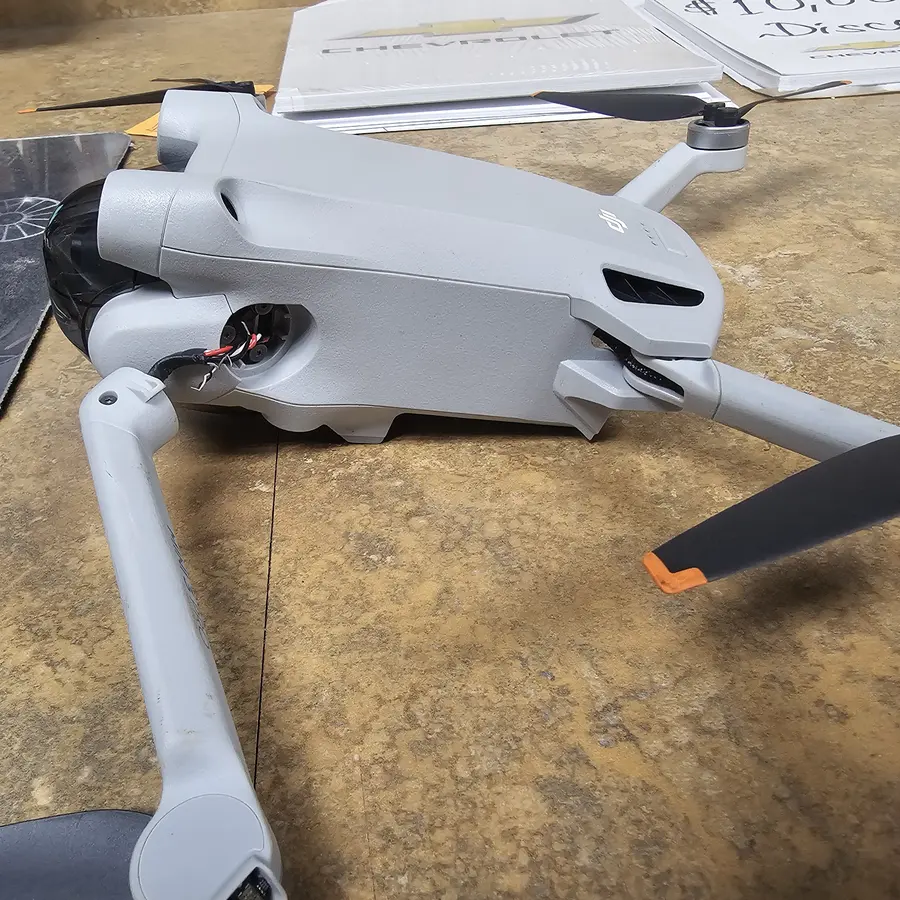
Drone Connection & Signal Repair in Charlotte, NC
A stable drone-to-controller link is a safety issue; the shop diagnoses damaged antennas, failing radio modules, loose cables, binding/firmware faults and crash damage, repairs them and tests the link at range.
We diagnose the link between your drone and controller for free, checking antennas, the transmission module, cables and firmware on both sides. You'll see the exact price for your model on this page. Most connection and signal repairs take 3 to 5 days, and we test the control link and video feed at range before returning it. Our 90-day warranty applies to the work.
Signs you need this repair
The controller searches forever, or the drone never shows as connected in the app. That can be pairing, firmware or a hardware fault.
Signal warnings close to home, in open areas, where you used to fly without trouble usually mean a damaged antenna or loose connector.
The drone still responds, but live view stutters, lags or drops. The video link is failing before the control link.
If the drone loses signal at a fraction of its old range, one or more antennas is likely damaged, often from a crash.
Losing control and triggering return to home in normal conditions is a warning sign. Ground it until it's checked.
Connection problems right after a crash point to antennas or cables. Right after a firmware update, they point to a version mismatch.
What usually causes it
On many folding DJI models, antennas run through the arms or landing legs. A hard landing can crush or disconnect them without visible damage.
The thin coaxial cables connect to the board with tiny snap-on connectors. Impacts and vibration can pop them off.
A dropped controller can have a broken antenna, a damaged cable to your phone, or a failing transmission board of its own.
An interrupted update, or a drone and controller on different firmware versions, can stop them pairing or cause dropouts.
Crowded Wi-Fi, power lines and metal structures cut range. That's not a fault, but we'll help you tell it apart from one.
How we fix it
- 1Gather the history
We ask when it started, where you fly and whether there was a crash or update. Then we check flight logs and error messages in the app for signal history.
- 2Check firmware and pairing
We confirm the drone and controller are on matching firmware and try a fresh link. If that alone fixes it, we tell you and don't open anything.
- 3Inspect antennas and cables
The aircraft is opened and each antenna, cable and connector is checked under the microscope for crushing, breaks or a connector that has come off.
- 4Check the controller
Remote controllers have antennas and a transmission board too. We open and inspect it when tests point that way.
- 5Repair the fault
Damaged antennas and cables are replaced, connectors are reseated and secured, and board-level faults on the transmission module are repaired on the bench.
- 6Range and link test
We fly the drone out and watch signal strength and video quality, comparing them with what the model should do.
Common repairs
Most signal faults come down to a few parts. We quote what the inspection finds.
Replaced when crushed or broken, often after a crash on the arms or legs.
Reseated or replaced when they've come loose or torn.
Antennas, phone cables, sticks and charging faults on the remote.
For a failed radio section on the drone or controller, repaired at component level where possible.
How long it takes
Connection and signal repairs usually take 3 to 5 days. A firmware or pairing fix can be quicker. Replacing antennas inside the arms, controller repairs and board-level radio work take longer, especially if parts have to be ordered. You get the window with your quote.
Models we repair
What customers say
I have been brining my family’s devices here for years now and it is always a pleasure. Mike & Gus are very knowledgeable and are able to communicate device issues honestly and in layman terms. Pricing is always fair and reasonable as well. Could not recommend them more to anyone in search of tech repair.Nathan Chadbourne · Repair · Google review
Michael is a total hero! Seriously, everyone on this team is amazing. They work absolute miracles every single day on our most complicated devices, from phones to computers. Best of all, they handle everything with incredible kindness and precision. They are exactly who you want in your corner when tech disasters strike out of nowhere. I also ended up replacing my laptop with one in their store. They gave me a great price too!Lynn N. · Repair · Yelp review
Very fast and reliable service! Very professional and they get the job done right the first time!! My device is like new!! Would definitely recommend!Ron Stoppable · Repair · Google review
Real customer reviews from Google and Yelp, quoted word for word. … marks where a longer review was shortened.
Before you bring it in
- Bring the drone, its controller and your phone cable, since any of them can be at fault.
- Bring a charged, healthy flight battery for the range test.
- Note where you fly and how far it gets before the signal drops.
- Screenshot any warnings in the DJI Fly app.
- Don't keep trying to fly it to see if it gets better.
Repair or replace?
Signal faults are usually antennas or cables, which are small parts on an otherwise healthy drone. Repair is almost always the right call. If the transmission board itself has failed on an older model and parts are scarce, we'll tell you if replacing the drone or controller makes more sense.
Thinking of fixing it yourself?
Things you can safely try: update the drone and controller to the same firmware, relink them in the app, and test in an open field away from Wi-Fi and power lines. If the problem is still there, it's probably hardware. Antenna connectors are tiny and the cables are thin. Prying them can tear the pad off the board, and opening the shell can damage other antennas along the way. Don't fly a drone with a known weak link.
After your repair
- Keep the drone and controller on matching firmware and let updates finish completely.
- Point the controller antennas the way your model's manual shows. Many link problems are antenna angle.
- Fly in open areas away from crowded Wi-Fi and power lines when you need full range.
- Store the controller so the antennas aren't bent or crushed.
Questions people ask
My DJI drone keeps losing signal. Can you fix it?
Yes. We check firmware, antennas, cables and the controller to find where the link is failing, then repair it and test it at range.
The drone won't connect to my controller at all. What's wrong?
Often a pairing or firmware mismatch, which can be quick to fix. If that's not it, a damaged antenna, a loose cable or a failed transmission module is likely.
Can a crash cause connection problems?
Yes. Antennas run through the arms or legs on many models, and a crash can crush them or knock their connectors loose without visible damage.
How much does a connection or signal repair cost?
See the pricing on this page. Firmware fixes cost less than antenna or board repairs, and you get a quote first.
How long does a connection repair take?
Most take 3 to 5 days. Firmware fixes can be faster, and board-level or ordered-part jobs take longer.
Could the problem be my controller and not the drone?
Yes. Controllers have their own antennas and radio board. Bring both, along with your phone cable, and we'll test each one.
Is weak signal dangerous?
It can be. A failing link can trigger return to home or cause a loss of control. Ground the drone until it's checked.
Do you repair DJI remote controllers?
Yes. We repair antennas, cables, sticks and charging problems on controllers, and quote after a free diagnostic.
Related repairs
Mail-in repair from anywhere in the U.S.
Free diagnostic when it arrives. Free insured shipping back.
- 1Tell us your model and the problem
- 2Ship it insured. We diagnose it within a day
- 3Approve the price. Fixed and back in 7–10 days