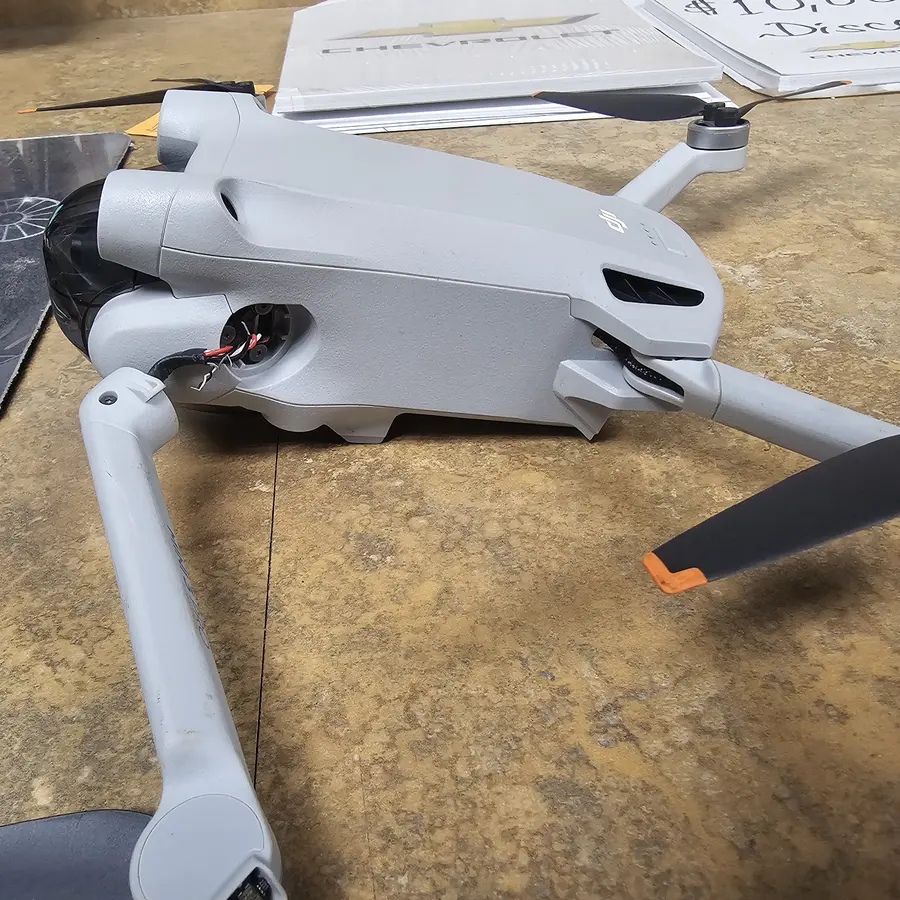
Drone Gimbal & Camera Repair in Charlotte, NC
The gimbal and camera are a drone's most delicate parts; crashes, hard landings or a stuck gimbal clamp damage motors, ribbon cables or alignment, which the shop repairs or replaces before recalibrating stabilization.
We diagnose gimbal and camera faults for free, checking the gimbal motors, ribbon cable, dampers, camera module and mount. The exact price for your drone model is shown on this page. Most gimbal and camera repairs take 3 to 7 days. After the repair we calibrate stabilization and record test footage on all three axes. Gimbal work carries our 90-day warranty.
Signs you need this repair
The gimbal doesn't do its startup dance, hangs limp, or the app shows a gimbal motor overload warning. That's usually a ribbon cable or motor problem.
Footage that leans to one side even after calibrating in the app usually means the gimbal is bent or a motor has slipped.
Jello, micro-shakes or a horizon that wobbles can be torn dampers, a weak gimbal motor or vibration from the props.
A gimbal that sags, twitches or loses position mid-flight has a failing motor, sensor or cable.
No live view, a black image, or recording errors and corrupted files point to the camera module, the cable or the card.
A scratched lens cover, a fogged lens after rain, or focus that won't lock on distant subjects.
What usually causes it
The gimbal hangs out front, so it takes the hit first. Arms and cameras bend, and the ribbon cable tears.
Powering up with the protector clamped on makes the motors push against it. That strains the motors and can damage the ribbon.
The gimbal ribbon is thin and moves constantly. It can tear in a crash, during transport or during a DIY repair.
Flying in rain or fog can fog the lens and corrode the camera and gimbal connectors.
How we fix it
- 1Diagnose
We power the drone on, watch the gimbal's startup behavior and read any errors. Then we inspect the motors, ribbon cable, dampers, camera module and mount under magnification.
- 2Find what failed
A ribbon tear often shows as a crease or break near the gimbal arm. A motor failure shows as weak holding force or noise. We test each axis individually.
- 3Repair or replace
Torn ribbons, gimbal motors, dampers and arms are replaced with DJI-compatible parts. If the camera module itself is damaged, we tell you before replacing it.
- 4Reassemble carefully
Gimbal ribbons have to be routed exactly as designed, so they don't rub or snag as the gimbal moves. Routing it wrong is the most common reason gimbal repairs fail.
- 5Calibrate
We run gimbal calibration and check level on all three axes, along with IMU calibration if the airframe was involved.
- 6Record test footage
We record in the air and play it back, checking stability, horizon, focus and file integrity before returning the drone.
Gimbal and camera parts
Most gimbal repairs come down to a few parts. We quote what the inspection shows.
The most common fix. A torn ribbon stops the gimbal or camera working entirely.
Replaced when a motor is weak, noisy or bent out of position.
Rubber dampers isolate vibration. Torn ones cause shaky footage.
For dead cameras, damaged sensors or scratched lens covers.
How long it takes
Most gimbal and camera repairs take 3 to 7 days. A ribbon cable or damper swap is at the faster end. A camera module replacement, damage to the main board or an ordered part takes longer. We give you the window with the quote.
Models we repair
What customers say
I have been brining my family’s devices here for years now and it is always a pleasure. Mike & Gus are very knowledgeable and are able to communicate device issues honestly and in layman terms. Pricing is always fair and reasonable as well. Could not recommend them more to anyone in search of tech repair.Nathan Chadbourne · Repair · Google review
Michael is a total hero! Seriously, everyone on this team is amazing. They work absolute miracles every single day on our most complicated devices, from phones to computers. Best of all, they handle everything with incredible kindness and precision. They are exactly who you want in your corner when tech disasters strike out of nowhere. I also ended up replacing my laptop with one in their store. They gave me a great price too!Lynn N. · Repair · Yelp review
Very fast and reliable service! Very professional and they get the job done right the first time!! My device is like new!! Would definitely recommend!Ron Stoppable · Repair · Google review
Real customer reviews from Google and Yelp, quoted word for word. … marks where a longer review was shortened.
Before you bring it in
- Copy your footage off the microSD card first.
- Take a screenshot of any gimbal errors in the app.
- Bring the gimbal cover and the controller.
- If you have a short clip showing the shake or tilt, bring it. It helps us diagnose.
Repair or replace?
The gimbal and camera are among the most expensive parts of a drone, but a lot of gimbal problems are a torn ribbon cable or dampers, which are much cheaper to fix. Repair is usually worth it. If the camera sensor itself is damaged on an older or entry-level model, the cost can come close to a new drone, and we'll tell you.
Thinking of fixing it yourself?
Start with the safe steps: take the gimbal cover off, restart, and run gimbal calibration in the app on a level surface. If the horizon is still tilted, try a gimbal auto-calibration. If it still errors or shakes, it's hardware. Gimbal ribbons are very fragile, and getting to them means removing the gimbal and opening the body, where it's easy to tear another cable. If you've started and something tore, stop and bring all the pieces in.
After your repair
- Take the gimbal cover off before every power-up.
- Use the cover in transport to protect the gimbal from bumps.
- Clean the lens only with a microfiber cloth or lens pen.
- Run a gimbal calibration if the horizon looks slightly off.
Questions people ask
My drone shows a gimbal error after a crash. Can you fix it?
Yes. It's usually a torn ribbon cable, a damaged motor or a bent gimbal arm. We find which one and quote before repairing.
Why is my drone footage shaky or tilted?
Shaking is usually torn dampers, a weak gimbal motor or prop vibration. A tilt that calibration doesn't fix usually means the gimbal is bent.
Can you replace just the camera on my DJI drone?
Often, yes, depending on the model and part availability. We check whether the problem is the camera, the gimbal or the cable before replacing anything.
How much does a gimbal or camera repair cost?
This page shows the price for your model. A ribbon cable repair costs less than a camera module, and you get a quote first.
How long does a gimbal or camera repair take?
Most take 3 to 7 days, depending on the part and whether it needs to be ordered.
What does gimbal motor overload mean?
The gimbal motor is pushing against something it can't move, like the gimbal cover, debris or a bent arm. If it happens with the cover off, the gimbal needs inspection.
Can you recover video that got corrupted?
Often, yes. Corrupted files on the microSD card can usually be repaired or recovered. Don't format the card. Bring it in.
Is there a warranty on gimbal repairs?
Yes. Gimbal and camera repairs carry our 90-day warranty.
Related repairs
Mail-in repair from anywhere in the U.S.
Free diagnostic when it arrives. Free insured shipping back.
- 1Tell us your model and the problem
- 2Ship it insured. We diagnose it within a day
- 3Approve the price. Fixed and back in 7–10 days