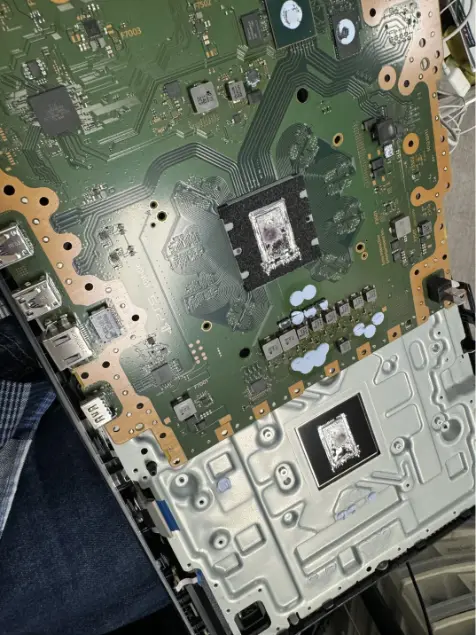
Console Power Repair (Not Turning On) in Charlotte, NC
A console that won't power on is rarely beyond saving; no-power faults usually trace to one failed part, found with bench power supplies and thermal cameras.
We trace no-power faults to the part that actually failed (power supply, fuse, shorted component or charging chip) and repair or replace just that. You'll usually have it back the same or next day. The diagnostic is free, the exact price for your model is shown on this page, and the repair has a 90-day warranty. No fix, no fee.
Signs you need this repair
No light, no beep, no fan. The console acts like it isn't plugged in, even on an outlet you know works.
The console tries to start and immediately shuts off. That's often a protection circuit tripping because something downstream is shorted.
A PlayStation that pulses blue and never goes white, or turns off a few seconds after starting, has a power or board fault, not a software problem.
Repeated beeps or a relay-like click with no picture usually mean the power supply is starting and then cutting out.
A Switch that won't turn on or show the charging icon after time on the official adapter often has a damaged charging chip or a deeply drained battery.
Unplug it and stop trying. Smell or visible burn marks mean a component has failed hard, and repeated attempts can spread damage.
What usually causes it
The PS4, PS5, Xbox One S, One X and Series consoles have internal power supplies that can fail from age, heat or a surge. The original Xbox One and Xbox 360 use an external brick instead.
A surge can blow the power supply, a fuse or protection parts on the board. Consoles plugged straight into the wall without surge protection are most exposed.
A single shorted capacitor or MOSFET can stop the whole console from starting. Dust, heat and liquid are the usual triggers.
Cheap docks and chargers that don't follow the USB-C power rules are a known killer of the Switch's M92T36 power-delivery chip and its charging chip.
Years of running hot with clogged vents stress the power circuits until something gives.
How we fix it
- 1Confirm the basics
We try a known-good power cord and outlet, check the power button, and look for physical or liquid damage. A surprising number of no-power consoles start up fine with a different cord.
- 2Test the power supply
The power supply is tested on its own under load. If it doesn't hold its output voltage, it's replaced with a new unit. We don't rebuild console power supplies, because the high-voltage side isn't worth the risk.
- 3Measure the board
With a good supply confirmed, we measure the board's power rails and check for shorts to ground. This tells us which section of the board the fault lives in.
- 4Find the failed part
Using a bench power supply and a thermal camera, we feed a little power into the shorted rail and watch for the part that heats up. That points to the exact component instead of guessing.
- 5Replace the component
The failed part is micro-soldered off and a new one goes on, whether it's a capacitor, a fuse, a MOSFET or a charging chip. We then recheck every rail before powering the console up.
- 6Stress test
A console that just came back from no power gets run hard, playing games and sitting at full load, so we know the fix holds and nothing else was hiding behind the first fault.
What usually gets replaced
No-power repairs are priced by what the diagnostic finds. We tell you which of these it is before any work starts.
When the supply itself is dead and the board is fine. This is the most straightforward no-power fix.
A fuse, capacitor, MOSFET or similar part replaced at board level. Slower diagnosis, but it saves a board that would otherwise be scrapped.
Replacing the M92T36 or charging chip, and sometimes the USB-C port that started the trouble.
If the brick is the problem, a replacement brick fixes it without opening the console.
How long it takes
Most no-power repairs are done the same or next day. A dead power supply is usually quick. Hunting down a shorted component on the board takes longer, and if a part has to be ordered we'll tell you that at diagnosis and keep you posted.
Models we repair
What customers say
Was able to get my ps5 back to life!!!! Appreciate you all. Very customer friendly also.Terence Barnes · Console power · Google review
Was able to fix motherboard of ps5 within 2 days after power surge... no other company would even touch it 10 out of 10The Observer2982 · Console power · Google review
… The techs at charlotte tech repair went out of their way to get my console working the same day. …tragiic · Console power · Google review
Real customer reviews from Google and Yelp, quoted word for word. … marks where a longer review was shortened.
Protect your console and everything else at home
Covered Everything protects your phone plus up to 25 more devices, like consoles, laptops and tablets, for $19.99 a month. Set it up when you collect your repair.
How Covered works90-day warranty
On parts and workmanship.
Covered Everything
$99 per claim on this console, $50 on your phone. Cancel anytime.
Fixed here, on our bench
Bring it in and we handle the claim with you.
Before you bring it in
- Try a different outlet and a different power cord before you come in.
- Tell us what happened right before it died: a storm, a spill, a move, a new charger or dock.
- Bring the power cord, or the brick for an original Xbox One or 360. For a Switch, bring its charger and dock.
- If you smelled burning, don't keep trying to power it on.
- Mention any earlier repair attempts, even if nothing was changed.
Repair or replace?
Most dead consoles have one failed part, which is why repair usually wins. A new power supply or a replaced component costs far less than a new console, and your storage stays in place. Replacement starts making sense when the main processor itself has failed, when liquid has damaged large areas of the board, or when an older console has several separate faults. We'll be straight with you about which case you're in after the free diagnostic.
Thinking of fixing it yourself?
There are a few safe things to try. Use a different outlet and cord. On a PS5 or PS4, hold the power button for about seven seconds until the second beep to try Safe Mode. On a Switch, leave it on the official charger for at least 30 minutes, then hold the power button for about 15 seconds. On an original Xbox One or 360, check the light on the brick. Past that point, stop. Console power supplies hold a high-voltage charge in their capacitors even when unplugged, and probing a board without knowing the rails can short something that was fine.
After your repair
- Plug the console into a surge protector, not straight into the wall.
- Give it room to breathe. Heat is a slow killer of power circuits.
- On a Switch, use the official charger and dock or certified ones that follow the USB-C power rules.
- If it dies again within 90 days with the same fault, bring it back. That's covered.
Questions people ask
My PS5 won't turn on at all. Can you fix it?
Usually, yes. It's often the internal power supply or a single failed part on the board. The free diagnostic finds which one before you're quoted.
Will I lose my saved games if the console won't power on?
A no-power repair usually doesn't touch the storage, so saves and games are normally still there. If the fault is near the storage or we see any risk, we tell you before starting.
Is a no-power repair cheaper than a new console?
In most cases, by a lot. The exception is a failed main processor, which we'll tell you about plainly.
How long does a console power repair take?
Most are finished the same or next day.
What is the PS4 blue light of death?
It's a PS4 that pulses blue and never goes white. It can be the power supply, a board fault, the HDMI encoder or the hard drive, which is why it needs testing rather than a guess.
My Switch died after I used a new dock. Is that related?
It can be. Docks and chargers that don't follow the USB-C power rules can damage the Switch's power-delivery and charging chips. We test those chips and replace whichever failed.
My original Xbox One won't turn on. Is it the brick?
Check the light on the brick. White or orange means the brick is putting out power. No light means the brick is likely dead. We test both the brick and the console.
Can a power surge kill a console?
Yes. A surge can take out the power supply, a fuse or protection parts. Often the rest of the console survives, which makes it repairable.
Can I mail in a console that won't turn on?
Yes. We take mail-in repairs from anywhere in the US with free insured return shipping.
Related repairs
Mail-in repair from anywhere in the U.S.
Free diagnostic when it arrives. Free insured shipping back.
- 1Tell us your model and the problem
- 2Ship it insured. We diagnose it within a day
- 3Approve the price. Fixed and back in 7–10 days