From the bench
PS5 overheating: dust and hair in the fan
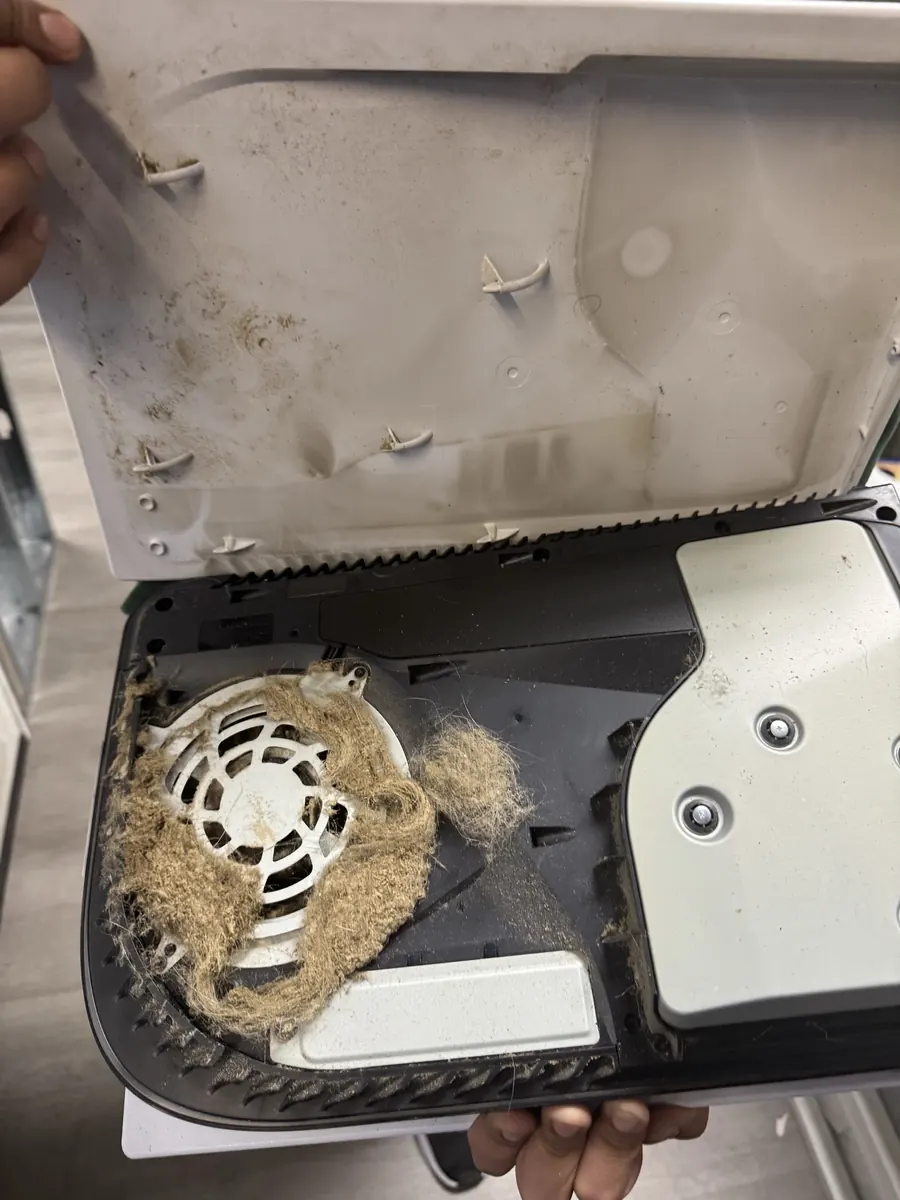
This PS5 was overheating. Under the cover, the fan intake was packed with dust and hair. We did a full clean of the console, fan and power supply, and reapplied the liquid metal.
Dust buildup and dried factory thermal paste make overheating a major long-term console killer. The shop fully disassembles the console, cleans fan and heatsink, and reapplies thermal paste and pads.
We fully take your console apart, clean the fan, heatsink and vents, and replace dried thermal paste and pads (or liquid metal on a PS5), then test it under load. It's a same-day service. The diagnostic is free, the exact price for your model is shown on this page, and the work carries a 90-day warranty.
A console that sounds like a jet on the home screen is working too hard to stay cool.
The console cuts power during demanding games to protect itself. That's thermal protection doing its job.
Games run fine for the first stretch, then stutter or freeze once the console has been on for 20 to 30 minutes.
The PS4 and PS5 show a message when the console is too hot. Seeing it once in a hot room is a warning. Seeing it regularly means it needs service.
Air coming out the back that's uncomfortable to hold your hand in, or a case that's hot to the touch, points to trapped heat.
A docked Switch that gets very hot, slows down or shuts off usually has a clogged vent or dried paste.
Dust and pet hair build up between the heatsink fins until air can barely pass through. The fan spins faster, but the heat has nowhere to go.
Factory paste dries out over the years and stops moving heat from the processor to the heatsink. Pads on the memory and power parts flatten and harden too.
Sony uses liquid metal between the PS5 processor and heatsink. Over time it can shift or thin out, and the processor runs hotter as a result.
Consoles packed into closed cabinets, set on carpet or crammed against a wall recirculate their own hot air.
A fan with a worn bearing spins slower, rattles or whines, and can't move enough air.
We run the console and watch fan behavior and surface temperatures with a thermal camera. That gives a baseline to compare against after the service.
We take the console apart down to the board, heatsink and fan. A real service means getting to the heatsink fins and the processor, not just blowing air in the vents.
The fan, heatsink fins, vents and power supply get cleaned of dust and debris. On a PS5 that includes cleaning out the console, the fan and the power supply.
Old paste is cleaned off the processor and heatsink and fresh paste goes on. Worn pads are replaced. On a PS5, the liquid metal is cleaned up and reapplied, with the surrounding parts kept protected.
We spin the fan by hand and under power, listening for bearing noise. A worn fan gets flagged so you can decide on a replacement.
The console is reassembled and run under a demanding game. We compare temperatures and fan noise to the baseline before it's ready for pickup.
The thermal material depends on the console. Each one has its own setup from the factory, and we service it to match.
Used on the processor in the PS4, Xbox One, Xbox Series and Switch. Fresh paste restores heat transfer that dried factory paste lost.
Soft pads that cool memory and power parts. Worn ones are replaced at the correct thickness so the heatsink still sits flat.
The PS5's processor uses liquid metal. It's conductive, so it has to be applied carefully and contained. We clean and reapply it as part of the PS5 service.
Only if the fan is worn or damaged. We tell you before fitting one.
Overheating service is a same-day job. A worn fan or a part that has to be replaced can add time, and so can finding another fault during the load test. If that happens, we call you before doing anything extra.
Live prices from our shop price sheet. Parts and labor included, with a 90-day warranty.
| Model | Overheating |
|---|---|
| PlayStation 5 Pro | $99.99 |
| PlayStation 5 | $99.99 |
| PlayStation 4 | $89.99 |
| PlayStation 3 | $89.99 |
| Nintendo 3DS | $79.99 |
| PlayStation 2 | $89.99 |
| Nintendo 2DS | $79.99 |
| Xbox Series X | $99.99 |
| Xbox Series S | $99 |
| Nintendo Switch OLED | $79.99 |
| Xbox One X | $79.99 |
| Xbox One S | $79.99 |
| Xbox One | $79.99 |
| Nintendo Switch / Switch Lite | $79.99 |
This PS5 was overheating. Under the cover, the fan intake was packed with dust and hair. We did a full clean of the console, fan and power supply, and reapplied the liquid metal.
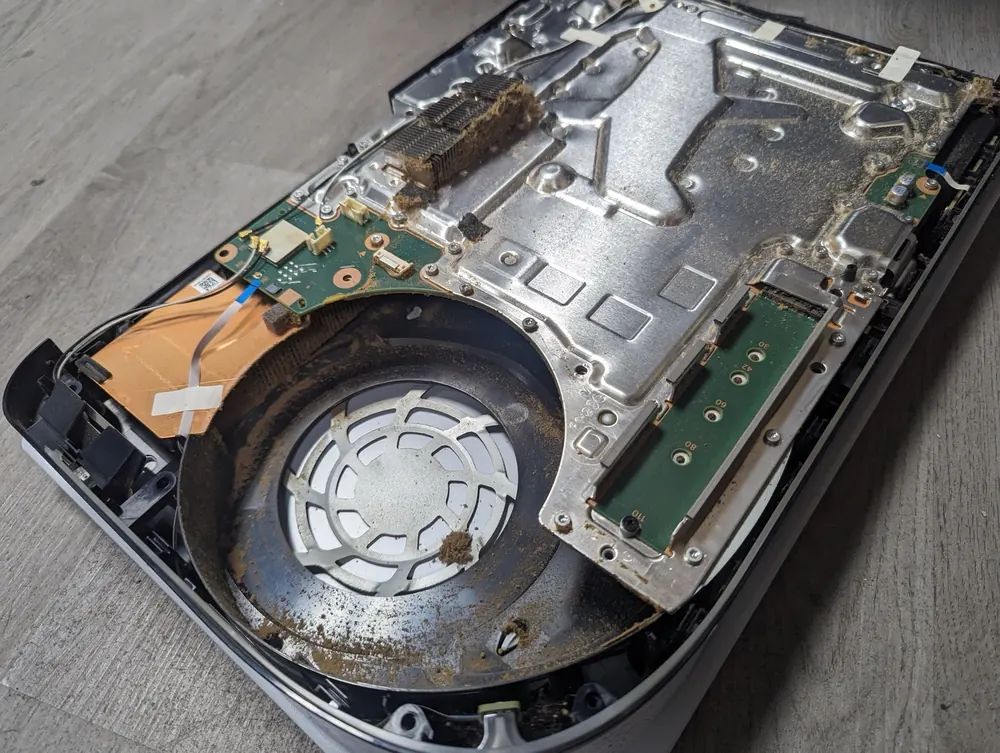
This PS5 came in overheating. Opened up, dust had packed into the fan intake and heatsink. It got a full clean-out.
… Came in to repair a fan connector that came off my ps5s motherboard. They essentially rebuilt a part of the motherboard to get it working which is not easy. Wouldn’t take my Ps5 to be repaired anywhere else.Jose Ulloa · Console clean-out · Google review
… had my repair and cleaning completed, same day, WITHIN 2 HOURS!!! No appointment necessary. …Christian Lafranchise · Console clean-out · Google review
The guys got me in very last minute and gave me an extremely reasonable deal to get my ps5 hdmi port and cleaning repaired and done! it was fast easy and very helpful. 10/10 would recommend for all tech repairs!Amin Gaines · Console clean-out · Google review
Real customer reviews from Google and Yelp, quoted word for word. … marks where a longer review was shortened.
Covered Everything protects your phone plus up to 25 more devices, like consoles, laptops and tablets, for $19.99 a month. Set it up when you collect your repair.
How Covered worksOn parts and workmanship.
$99 per claim on this console, $50 on your phone. Cancel anytime.
Bring it in and we handle the claim with you.
Overheating is the cheapest major console problem to fix, and the one most worth catching early. A clean and repaste brings temperatures back down and takes stress off the power supply and the board. Ignoring it is how a fixable heat problem turns into a no-power repair later. The only time we'd steer you away is a console that already has serious board damage from years of heat, and the diagnostic will show that.
You can do some useful things at home. Give the console space on every side, keep it off carpet and out of closed cabinets, and on a PS5, remove the side covers and vacuum the two dust catcher holes. Cleaning out the inside is a different job. PS4 and Xbox consoles have fragile ribbon cables and clips. On a PS5 the liquid metal is electrically conductive, and if it smears onto the board it can short components. If you open it and something doesn't come apart easily, stop there before you crack a clip or tear a connector.
Usually dust in the heatsink, a console in a cramped spot, or the liquid metal no longer transferring heat well. A teardown, clean-out and liquid metal reapplication fixes most loud PS5s.
Yes. Years of running hot stress the processor's connections and the power circuits. Catching it early is much cheaper than a board repair later.
Every one to two years for most homes, more often with pets, smoking or a dusty room.
It's same day.
A full clean-out of the console, the fan and the power supply, plus cleaning and reapplying the liquid metal on the processor. Then it's load tested.
It can move some loose dust, but it often packs dust deeper into the heatsink. It also does nothing about dried paste. A teardown is the real fix.
Yes. Series consoles run cooler than older ones, but dust and aging paste still catch up with them.
In most cases, yes. Once heat moves properly, the fan doesn't need to spin as fast.
A thermal service doesn't involve the storage, so your games and saves usually stay put. We'll tell you if we see any risk.
Free diagnostic when it arrives. Free insured shipping back.