From the bench
iPod Classic charging port
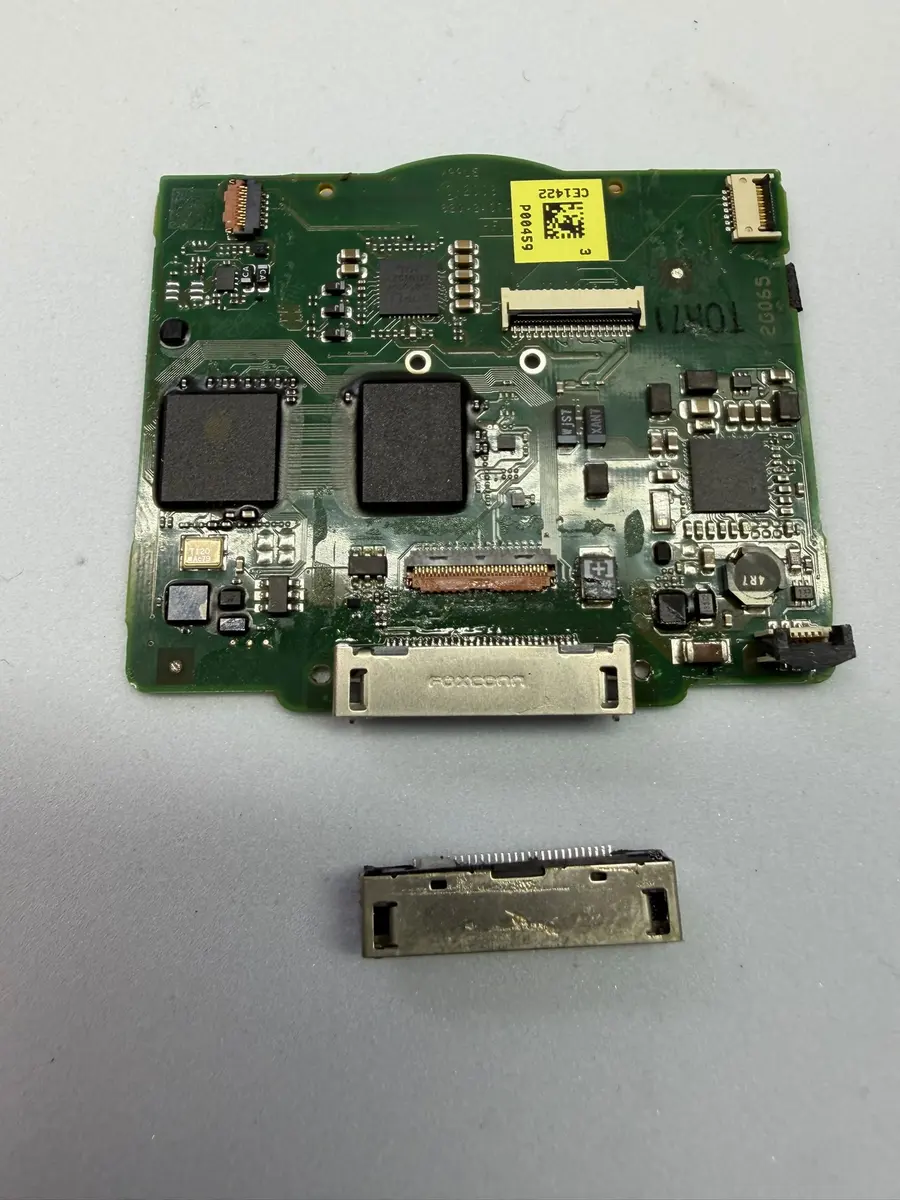
The worn 30-pin dock connector, removed and replaced on the logic board.
Flash Storage, Batteries, Rockbox
iPod Classic-family devices evaluated for click-wheel, power, display, charging, audio and storage symptoms; every job starts with identification, diagnosis and an approved quote.
Not in the Charlotte area? Mail it in from anywhere in the U.S.
We repair click-wheel iPod Classic-family players in Charlotte and by mail from anywhere in the US. Every job starts with identifying the generation and a free diagnosis of the click wheel, power, screen, dock connector, audio and storage. The exact price for your iPod is shown on this page. Timing depends on inspection and parts, nothing starts without your approval, and the repair carries our 90-day warranty.
Scrolling jumps, the center button does nothing, or only some buttons work. The click wheel ribbon or its connector is the usual cause.
A dead screen, an Apple logo that loops, or a player that dies the moment you unplug it. Check the Hold switch first, since a locked iPod looks dead.
A folder with an exclamation mark, a sad iPod face or a player that clicks while loading music points to a failing hard drive or its cable.
The computer doesn't see it, or it only charges with the cable at an angle. The 30-pin dock connector may be worn or broken loose from the board.
Sound drops when you move the cable, or plays in one ear. The headphone jack and Hold switch share a ribbon cable that wears and tears.
Cracks, lines or a backlight that has gone dark while the iPod still plays music.
The newest Classic is well over a decade old. Batteries, hard drives and ribbon cables all wear out with time.
Hard drives in iPods have moving parts that hate drops, especially while playing.
Years of plugging in 30-pin cables loosens the connector, and its solder joints can crack away from the board.
These iPods are hard to open, and pry tools often tear the headphone jack ribbon or bend the case.
We check the model and generation, since the 5th generation, the 6th generation Classic and the later 7th generation use different parts and cables.
We check the Hold switch, try a reset, and test with known-good cables and a known-good computer before opening anything.
Classic cases are held by tight clips. We work the edges open with thin tools and lift the back carefully, because the headphone jack ribbon connects the two halves and tears if the case is pulled apart.
We test the battery, the hard drive and its ribbon, the click wheel, the screen and the dock connector, one at a time.
Worn ribbons, batteries, screens and click wheels are replaced. Dock connectors soldered to the logic board are replaced with micro-soldering here in Charlotte. We've replaced 30-pin connectors directly on iPod Classic logic boards.
We test playback through both channels, the click wheel, charging and syncing before closing the case.
Most iPod Classic problems come down to a handful of parts. Part availability varies by generation, and we confirm it with your quote.
For short runtime, shutdowns or swelling.
For the sad iPod, folder icon or clicking. Or skip the hard drive entirely: we upgrade iPod Classics to flash storage.
For unresponsive controls, cracks or a dark display.
For charging, syncing and audio problems, including board-level dock connector replacement.
We do more than fix iPod Classics. We upgrade them, so the one you already own works better than it did new.
We swap the old spinning hard drive for flash storage. It is silent, lighter, handles drops far better than a hard drive, and lets you carry a much bigger library.
An expanded, higher-capacity battery gives you a lot more listening time between charges than the original cell.
Scratched and dented backs, cracked fronts or a color change. We reshell your iPod with a new case and refit the parts.
We can install Rockbox, the open-source firmware that adds wider audio format support like FLAC, an equalizer and custom themes, alongside or instead of the Apple software.
Click wheels, headphone jacks, dock connectors and other upgrades. Tell us the model and what you have in mind, and we will tell you what fits before any work starts.
Timing depends on what the inspection finds and on part availability for your generation. Simple battery or ribbon swaps are quicker than hard drive or board-level work. We give you the timing with your quote, before any work starts.
Very fast and reliable service! Very professional and they get the job done right the first time!! My device is like new!! Would definitely recommend!Ron Stoppable · Repair · Google review
Service was super fast and all of the staff was super helpful! Michael and Tony were great!Hannah Liddy · Repair · Google review
They are, without a doubt, the best device repair shop in town. Every experience I’ve had with them has been exceptional. …Terrell Grier · Repair · Google review
Real customer reviews from Google and Yelp, quoted word for word. … marks where a longer review was shortened.
There's no new iPod Classic to buy. If you love the click wheel and dedicated player, repair is the way to keep it. Used ones are often just as worn as yours, with old batteries and drives. Repairing yours with known parts is usually the better choice.
Opening an iPod Classic is harder than it looks. The case is held by tight clips and the headphone jack ribbon connects the two halves, so it tears easily. Dock connectors are soldered to the board. If you've opened it and something tore, or it won't power on after reassembly, stop and bring everything in.
We work on click-wheel iPod Classic-family players. Send photos and the model number if you're not sure.
No. Storage modifications and capacity upgrades aren't guaranteed and are confirmed only after inspection.
Yes. Start a mail-in request and wait for packing instructions. We take mail-ins from anywhere in the US with free insured return shipping.
Eligible completed repairs include our 90-day warranty.
Yes. We replace 30-pin dock connectors on the logic board using micro-soldering.
Usually it's the hard drive or its cable. We diagnose it and quote the right repair.
Often, if the drive is still readable. Tell us before we start if the music is important.
Pricing for your model is on this page. You get a quote before any work.
Free diagnostic when it arrives. Free insured shipping back.