Steam Deck Repair in Charlotte, NC
The Steam Deck is a full PC in a handheld, needing laptop-style board-level skills rather than a console swap. The shop repairs both the original LCD and OLED models.
Not in the Charlotte area? Mail it in from anywhere in the U.S.
We repair the Steam Deck LCD and OLED like the handheld PC it is: micro-soldered USB-C ports, stick drift, screens, power faults, fans and SSD upgrades. Most repairs take 1 to 3 days. The diagnostic is free, the exact price for your model is shown on this page, and every repair gets a full functional test and a 90-day warranty.
Signs you need this repair
The Deck charges only with the cable held a certain way, or not at all. Usually the USB-C port, sometimes the charging circuit.
The camera creeps or menus scroll on their own. The thumbstick module is worn.
Cracks, dead touch zones, lines or a dark display after a drop.
The Deck shows nothing, or shuts off right after the logo. Power circuit, battery or storage are the suspects.
A fan that whines or roars, a hot grip, or games slowing down under load.
One speaker dead or sound cutting in and out, often from a loose or damaged speaker connection.
What usually causes it
Playing while charging puts the cable at an angle, and over time the port's joints crack or the port loosens.
The stock thumbsticks use wear-prone sensors, and heavy play wears them into drift.
The Deck is heavy for a handheld. Drops crack screens and stress ports and internal connectors.
The Deck pulls air through a small fan and vent that collect dust and lint, especially when it's set down on beds and couches while running.
A failing SSD or a corrupted install can look like a power problem, which is why we test storage too.
How we fix it
- 1Free diagnostic
We test charging with a USB meter, check power, sticks, screen, audio and temperatures, and confirm whether you have an LCD or OLED Deck before quoting.
- 2Open it the right way
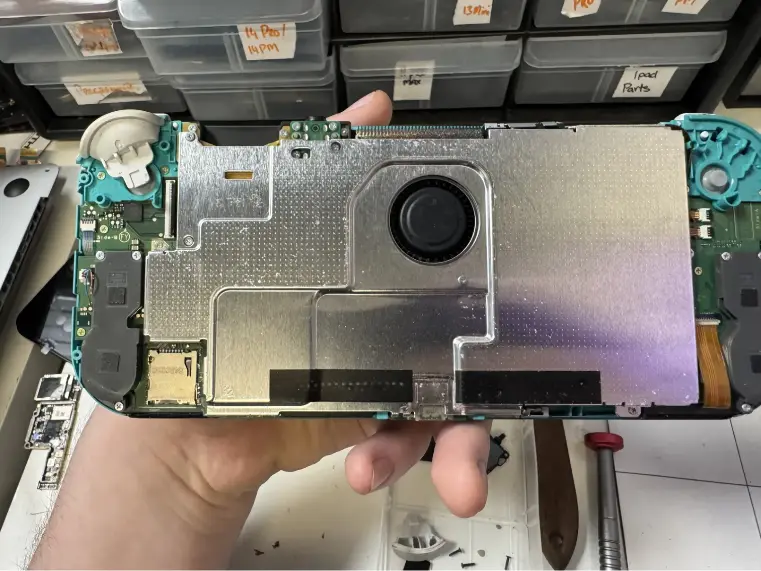
The back shell is held by screws and clips. We take it apart carefully and disconnect the battery before touching anything else.
- 3USB-C port replacement
The Deck's USB-C port is soldered to the board, so we remove the board and micro-solder a new port under a microscope. Then charging and display output are tested.
- 4Sticks, screen and fan
Thumbstick modules connect by ribbon cable and are replaced and calibrated. Screens are swapped as an assembly. Fans are cleaned or replaced, and thermal paste is renewed if temperatures call for it.
- 5SSD upgrade and SteamOS restore
If you're upgrading storage, we fit the new M.2 2230 SSD and install SteamOS fresh from Valve's recovery image.
- 6Full functional test
Every button, both sticks and trackpads, touch, audio, charging, Wi-Fi and a game under load are checked before the Deck is returned.
LCD or OLED, and what fits
Valve's two models share a shape but differ in screens and boards. Look up your model's exact price on this page.
The original. Screens, USB-C ports, sticks and fans are the usual repairs.
OLED screen, bigger battery and an updated board. The OLED panel is a pricier part than the LCD.
Swap the stock SSD for 512 GB, 1 TB or 2 TB in the M.2 2230 size. SteamOS is reinstalled, so games download again.
If drift keeps coming back, ask whether TMR Hall Effect sticks are an option for your Deck. They use a magnetic sensor that doesn't wear like the stock sticks.
How long it takes
Most Steam Deck repairs take 1 to 3 days. Stick swaps and fan cleaning sit at the shorter end. Board-level charging work, a screen we have to order, or a full SSD upgrade with a fresh SteamOS install take longer. Your quote comes with a realistic ready time.
Models we repair
What customers say
My Steam Deck had a one-day turnaround as told. Screen was replaced and broken connector was fixed. Another local shop didn’t have the experience to repair. Glad I called this shop. Competitive pricing is a plus. …Ariana Smith · Steam Deck · Google review
EXCELLENT WORK!!!!!!!!! Prices Are Beyond Fair , Customer Service Was Wonderful & Helpful! Recommend Anyone Who Needs Games Or Phones Repaired. Awesome Stickers Too That They Provide. 10/10 ExperienceDeasaan Sargent · Console repair · Google review
… Definitely A five star rank for me with the experience I had I bring all of my electronics here PlayStation iPad iPhone, android PS5 Xbox I mean whatever it is if it’s electronic, I’m pretty sure they can fix itCoel Young · Console repair · Google review
Real customer reviews from Google and Yelp, quoted word for word. … marks where a longer review was shortened.
Protect your Steam Deck and everything else at home
Covered Everything protects your phone plus up to 25 more devices, like consoles, laptops and tablets, for $19.99 a month. Set it up when you collect your repair.
How Covered works90-day warranty
On parts and workmanship.
Covered Everything
$99 per claim on this Steam Deck, $50 on your phone. Cancel anytime.
Fixed here, on our bench
Bring it in and we handle the claim with you.
Before you bring it in
- Make sure Steam Cloud is syncing your saves. Some non-Steam games and emulators keep saves only on the Deck, so back those up yourself.
- Charge it if it still takes a charge.
- Bring your charger if the problem involves charging.
- Remove the microSD card, or tell us it's in there.
- Know your Steam password. You may need to sign back in after storage work.
Repair or replace?
Repair usually wins on a Steam Deck. USB-C ports, sticks, fans and even screens cost much less than a new Deck, and Valve built it to be opened. The decision gets closer on an older LCD Deck with a cracked screen and other faults at the same time, or when the board has liquid damage. In that case, we'll lay out the cost next to what a new one runs and let you choose.
Thinking of fixing it yourself?
Valve sells some parts and publishes repair guides, and stick and fan swaps are reasonable home jobs if you're careful with the clips and disconnect the battery first. Screen replacement is harder, since the glass is glued and cracks spread when you pry. USB-C port replacement is a micro-soldering job on a dense board, and a hot iron near the battery connector is no place to learn. If you've stripped a screw, torn a ribbon or the Deck won't power on after you closed it up, stop and bring it in with all the parts.
After your repair
- Use a right-angle USB-C cable when you play while charging. It takes strain off the port.
- Don't run the Deck on a blanket or bed where the vent gets covered.
- Carry it in its case. Most screen cracks happen in bags.
- Keep Steam Cloud on and back up non-Steam saves now and then.
- Same fault again within 90 days? Bring the Deck back under warranty.
Questions people ask
Can you fix a Steam Deck that won't charge?
Yes. We test the cable, the port and the charging circuit. Most often it's the USB-C port, which we micro-solder in-house.
Can you fix Steam Deck joystick drift?
Yes. The worn thumbstick module is replaced and calibrated. Ask about TMR Hall Effect sticks if you want one that doesn't wear the same way.
Do you repair the Steam Deck OLED?
Yes. We repair both the original LCD model and the OLED.
Can you upgrade the Steam Deck's SSD storage?
Yes. We fit a 512 GB, 1 TB or 2 TB M.2 2230 SSD and reinstall SteamOS.
My Steam Deck screen is cracked. Can you replace it?
Yes. The screen is replaced as an assembly and tested for touch and brightness. LCD and OLED screens are priced separately.
How long does Steam Deck repair take?
Plan on 1 to 3 days for most jobs. Board-level charging work and ordered screens sit at the longer end.
Will a repair wipe my Steam Deck?
Most repairs don't touch the SSD, so your games usually stay. An SSD upgrade means a fresh install, so sync to Steam Cloud first. We tell you about any data risk before starting.
My Deck's fan is loud. Is something wrong?
Some fan noise under load is normal. A whine, rattle or fan that runs high at idle usually means dust or a worn fan, which we clean or replace.
Can I protect my Steam Deck?
Covered Everything can cover a Steam Deck alongside your phone and other devices for a monthly fee. Ask us how claims work.
Can I mail in my Steam Deck?
Yes. Ship your Deck from anywhere in the US in its case, and the insured return is on us.
Related repairs
Mail-in repair from anywhere in the U.S.
Free diagnostic when it arrives. Free insured shipping back.
- 1Tell us your model and the problem
- 2Ship it insured. We diagnose it within a day
- 3Approve the price. Fixed and back in 7–10 days