Data Recovery in Charlotte, NC
Specialists use professional recovery hardware and software in a controlled environment; data is often still recoverable, and a no-recovery-no-fee evaluation shows what can be saved at no risk.
Bring in the drive or the whole computer. We evaluate it for free and tell you what's recoverable and what it costs. If you approve, we image the drive sector by sector, recover from the copy, and return your files on a new drive. Most recoveries take 2 to 5 days. The price for your situation is quoted after evaluation, and if we recover nothing, you pay nothing.
Signs you need this repair
Repeated clicking usually means the heads can't read. Beeping often means the motor can't spin. Power it off, because every attempt can scratch the platters.
Don't. The file system is damaged but the data is usually still there. Formatting makes recovery harder.
Corrupted files, folders that show zero bytes, or photos that open half grey point to bad sectors or file system damage.
Often recoverable from hard drives if you stop using the drive right away. SSDs are harder, for reasons explained below.
A dead laptop or failed Windows install doesn't always mean the drive failed.
An SSD that reports a tiny capacity or a strange name has usually had a firmware or controller failure.
What usually causes it
Read heads wear or crash, motors seize, and surfaces develop bad sectors. Drops while running are a common trigger.
SSDs fail without warning signs like noise. The flash chips may be fine while the controller that manages them has stopped responding.
Accidental deletion, formatting, a corrupted partition table or a failed update. The hardware works but the map to your files is broken.
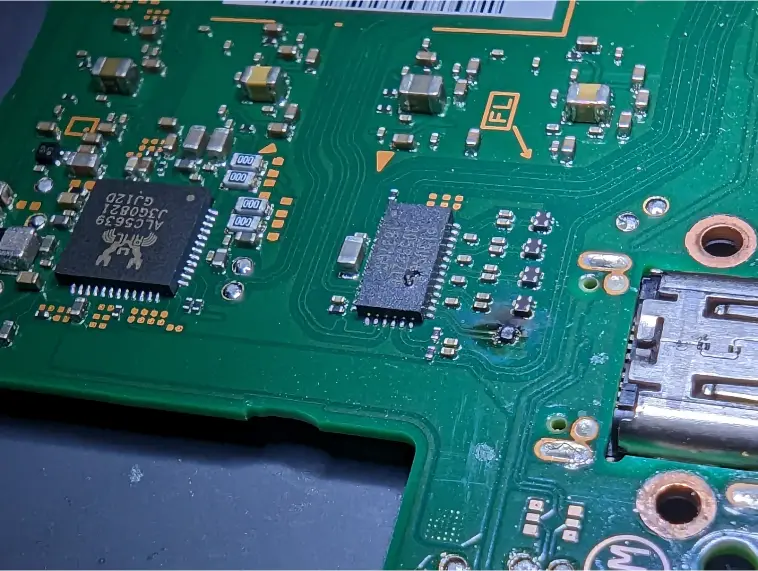
A surge, liquid or a failed component on the drive's circuit board, or on a laptop board where storage is soldered on.
How we fix it
- 1Free evaluation
We check how the drive behaves without stressing it, and tell you what we think is recoverable, the likely cost and the risk. Nothing happens without your approval.
- 2Stabilize the hardware
If the drive's electronics or a laptop board has failed, we repair what's needed to get the storage readable. On many modern Macs this means repairing the logic board, because the storage is soldered and encrypted to it.
- 3Image, don't browse
We make a sector-by-sector copy of the drive with tools that read the good areas first and come back for weak ones. This avoids hammering a failing drive the way a normal copy would.
- 4Recover from the image
All file recovery happens on the copy, never the original. We rebuild folders and file names where the file system allows, and carve files by type where it doesn't.
- 5You check the file list
Before you pay, we show you what came back so you can confirm the files you care about are there.
- 6Delivery on a new drive
Your data goes onto a new drive you take home. We return your original drive too.
What kind of recovery you need
The cost and time depend on what failed, not on how much data you have. Here's how cases usually sort out after evaluation.
Healthy hardware, damaged or deleted files. Usually the quickest and least expensive type.
A drive with bad sectors or weak heads that still reads. Careful imaging gets the most out of it before it gets worse.
The drive's board, an SSD controller issue, or a dead laptop board has to be dealt with before data can be read.
Seized motors, crashed heads or scored platters. We'll tell you plainly what's involved and what the odds look like before anything is done.
How long it takes
Most recoveries take 2 to 5 days. A healthy drive with deleted files can be at the quick end. A drive full of weak sectors images slowly by design, because rushing it loses data. Large drives, board repair before imaging, and encrypted drives where we need your password or recovery key all add time. We'll give you an estimate at evaluation and update you if it changes.
Models we repair
What customers say
We Save Data saved the day!I found We Save Data after almost being taken advantage of somewhere else! I received an inflated quote from another business & decided to contact We Save Data for a 2nd opinion. …QC True Feedback · Data recovery · Google review
… I originally brought it in with my external hard drive, hoping to just get the few files off the laptop BUT in less than an hour Michael had the old faithful laptop back up and running.Chozen Child · Data recovery · Google review
Michael if We Save Data is AMAZING!! He is definitely the guru of this business! Michael restored my laptop after I locked myself out, could not remember the password and no longer had access to my old email account. …Alana Gibbs · Data recovery · Google review
Real customer reviews from Google and Yelp, quoted word for word. … marks where a longer review was shortened.
Protect your computer and everything else at home
Covered Everything protects your phone plus up to 25 more devices, like consoles, laptops and tablets, for $19.99 a month. Set it up when you collect your repair.
How Covered works90-day warranty
On parts and workmanship.
Covered Everything
$99 per claim on this computer, $50 on your phone. Cancel anytime.
Fixed here, on our bench
Bring it in and we handle the claim with you.
Before you bring it in
- Stop using the drive or computer. Every write, update or reboot can overwrite deleted files.
- Don't run free recovery software or CHKDSK on a clicking or failing drive.
- List the folders or file types that matter most, like a Pictures folder or a QuickBooks file.
- Find your BitLocker recovery key or Mac login password if the drive is encrypted.
- Bring the whole laptop if you aren't sure where the data is stored, plus any external drive enclosures.
Is recovery worth it?
That depends on what the files are worth to you. Irreplaceable photos, business records and thesis work almost always are. If your files are already in OneDrive, iCloud or Google Photos, check there first, because you may not need us at all. If the evaluation shows a drive with severe damage and low odds, we'll say so and let you decide. You won't be charged for an attempt that recovers nothing.
Thinking of fixing it yourself?
If a healthy drive has accidentally deleted files, reputable recovery software can work, as long as you install it on a different drive and save the recovered files somewhere else. That's where safe DIY ends. Don't put a clicking drive in the freezer, tap it, open it, or keep restarting it to see if it comes back. Don't run disk repair tools on a drive that's failing, because they write to it. And don't keep using an SSD after deleting files, because TRIM can erase the blocks for good. When in doubt, power it off and bring it in.
After your repair
- Check your recovered files soon, then copy them to a second location.
- Set up a backup you don't have to remember: File History or Time Machine to an external drive, plus a cloud service.
- Keep your BitLocker key or Mac password somewhere safe outside the computer.
- Replace drives that start throwing SMART warnings before they fail completely.
Questions people ask
What does no recovery, no fee mean?
If we can't recover your data, you don't pay for the attempt. If we recover files, you see the list before paying.
How much does data recovery cost?
It depends on what failed, which is why the evaluation comes first. Logical recoveries cost less than drives that need electronic or physical work. You get a quote before we start.
Should I keep trying to power on a clicking drive?
No. Clicking usually means the heads can't read the surface, and each power cycle risks scratching the platters. Power it off and leave it off.
Can you recover data from a dead computer?
Usually. On most PCs we can remove the drive and read it directly. On Macs with the T2 chip or Apple Silicon, the storage is encrypted and tied to the logic board, so we repair the board first to get the data back.
Can you recover deleted files from an SSD?
Sometimes, but less often than from a hard drive. Most SSDs use TRIM, which clears deleted blocks soon after deletion. Stop using it right away and bring it in.
Will you look at my files?
We look at file names and test that files open so we can confirm the recovery worked. We don't browse your files beyond that.
Can you recover a drive that needs to be formatted?
Usually, yes. That message means the file system is damaged. Don't click format. Bring the drive in and we'll recover from an image of it.
Can you recover photos from a phone or memory card?
Yes. We handle phones, tablets, SD cards and USB flash drives too, and each has its own page with details.
Can I mail my drive in?
Yes. We accept mail-in from anywhere in the US with free insured return shipping. Pack the drive in an anti-static bag with plenty of padding.
Related repairs
Mail-in repair from anywhere in the U.S.
Free diagnostic when it arrives. Free insured shipping back.
- 1Tell us your model and the problem
- 2Ship it insured. We diagnose it within a day
- 3Approve the price. Fixed and back in 7–10 days